
Understand Analytics metrics
interact
🇪🇸 Si quieres información en español, consulta este tutorial en vídeo (opens new window).
🇫🇷 Si vous souhaitez des informations en français, regardez ce tutoriel vidéo (opens new window).
🇵🇹 Se quiseres informações em português, vê este tutorial em vídeo (opens new window).
🇮🇹 Se vuoi informazioni in italiano, guarda questo tutorial video (opens new window).
🇩🇪 Wenn Sie Informationen auf Deutsch möchten, sehen Sie sich dieses Video-Tutorial an (opens new window).
Analytics shows how shoppers interact with your catalogue through search. It also shows how searches perform throughout the shopping journey, from clicks to add-to-carts, that is, products that shoppers add to the basket.
To open Analytics, click Analytics > Analytics in the left-side menu.
The first data appears during the first 24 hours of use, or after the initial indexation is complete. Analytics data is updated every hour.
To filter data by language or time frame, or to export it, see Manage Analytics.
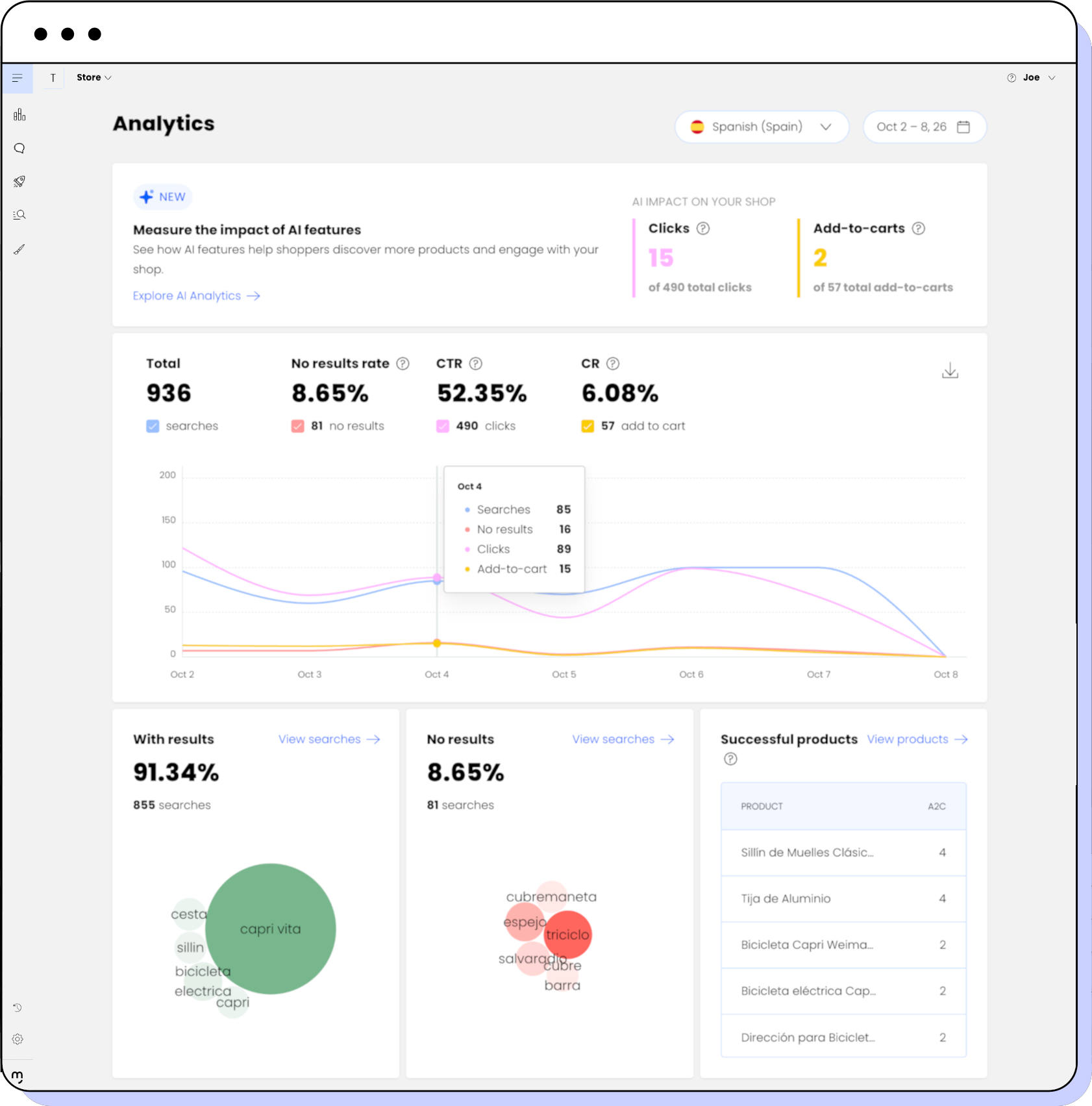
The Analytics dashboard shows the following sections:
AI impact on your shop
The Measure the impact of AI features section summarises how Motive AI search features contribute to product clicks and add-to-carts in your shop:
- Clicks: Number of product clicks through AI search features.
The total number of product clicks in your shop appears below. - Add-to-carts: Number of add-to-carts through AI search features.
The total number of add-to-carts in your shop appears below.
For example, 15 of 490 total clicks and 2 of 57 total add-to-carts come through AI search features.
To see the data for each AI feature, click Explore AI Analytics or click Analytics > AI Analytics in the left-side menu. To learn more, see Understand AI Analytics metrics.
Search performance
The main section in the Analytics page shows how search performs for a selected time frame.
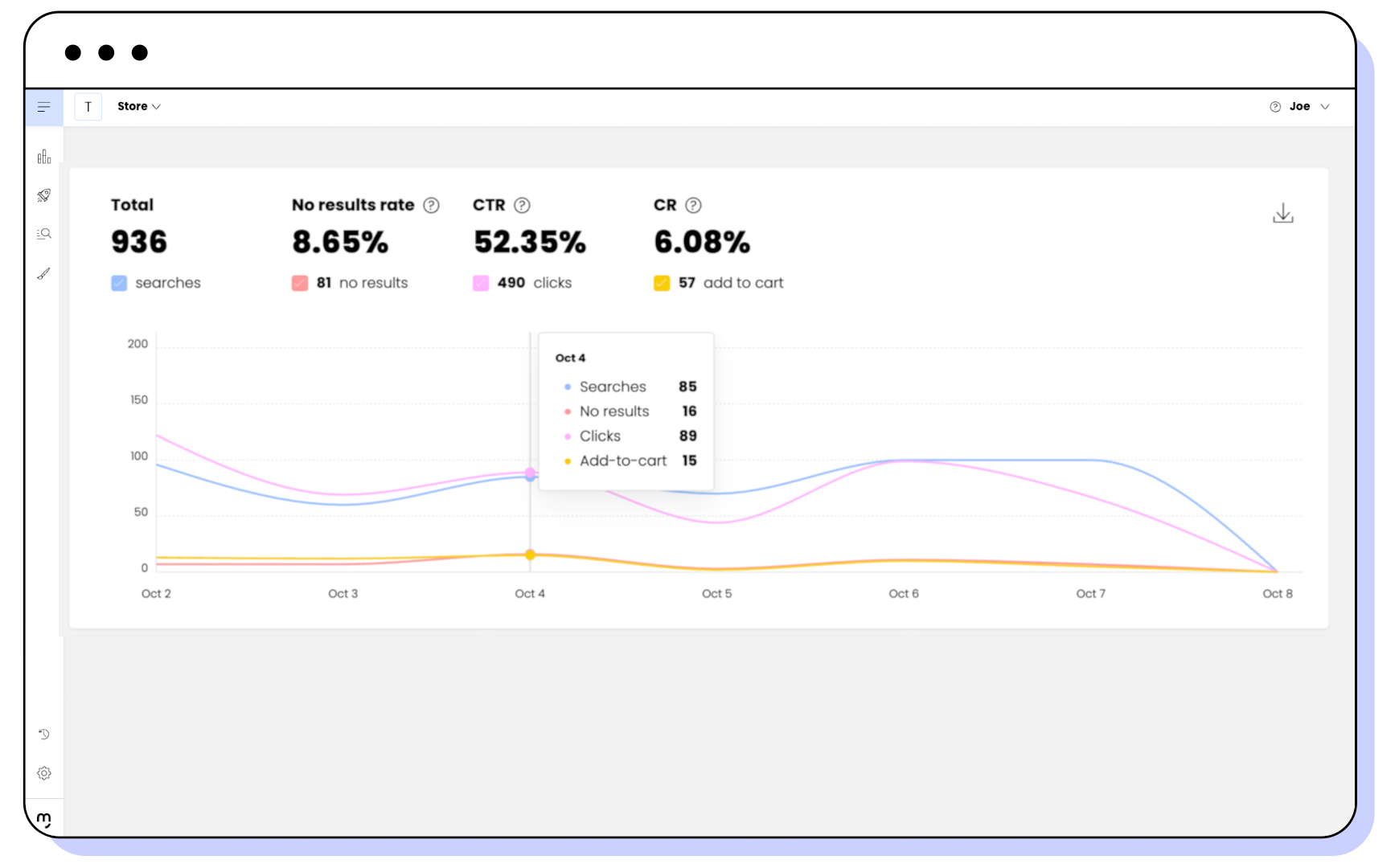
This section displays the following:
- Total: Total number of searches.
- No results rate: Percentage of searches that return no results.
The number of searches with no results appears below. - CTR: Click-through rate. Percentage of searches that result in clicks on products.
The number of clicks on product cards and add-to-cart buttons appears below. - CR: Conversion rate. Percentage of searches that result in clicks on add-to-cart buttons.
The number of add-to-cart clicks from product cards and product pages appears below.
For example, in the image, shoppers make 936 searches:
- Of these searches, 81 return no results, so the no results rate is 8.65%.
- Shoppers click products 490 times, so the CTR is 52.35%.
- Shoppers click add-to-cart buttons 57 times, so the CR is 6.08%.
The chart shows how these metrics evolve over the selected time frame. By default, it shows all metrics. To show or hide a metric, select or clear the checkbox next to it. Hover over a date to see the data for that date.
Searches with and without results
Two sections show how many searches return results and the most searched terms for the selected time frame:
With results: Percentage and total number of searches that return results.
No results: Percentage and total number of searches that return no results.
Hover over a term to see the number of times shoppers searched for it.
Successful products
The Successful products section shows the products with the highest number of add-to-carts.
Counting searches
Motive Commerce Search counts searches in two ways: one for statistics and another for billing.
In statistics, such as in Analytics or Motive Backroom, every interaction with the search box is recorded. This includes typing, modifying a search or selecting a suggestion. This level of detail shows exactly how shoppers refine their searches. For example, typing "short red skirt" with type-ahead suggestions can generate up to 13 searches in the statistics, one for each letter or suggestion.
For Billing, only completed search intents are charged. If a shopper types "short red skirt" and then changes it to "black and white skirt", Analytics can show many searches, but billing counts only one completed search.